Reporting and Finance
Funnel and Pipeline
The Registration Funnel shows how people move through your registration process — from first page view through to confirmed registration. The Pipeline view extends this to show prospective registrants who have been invited but not yet registered. Together, they help you identify drop-off points and prioritize follow-up.
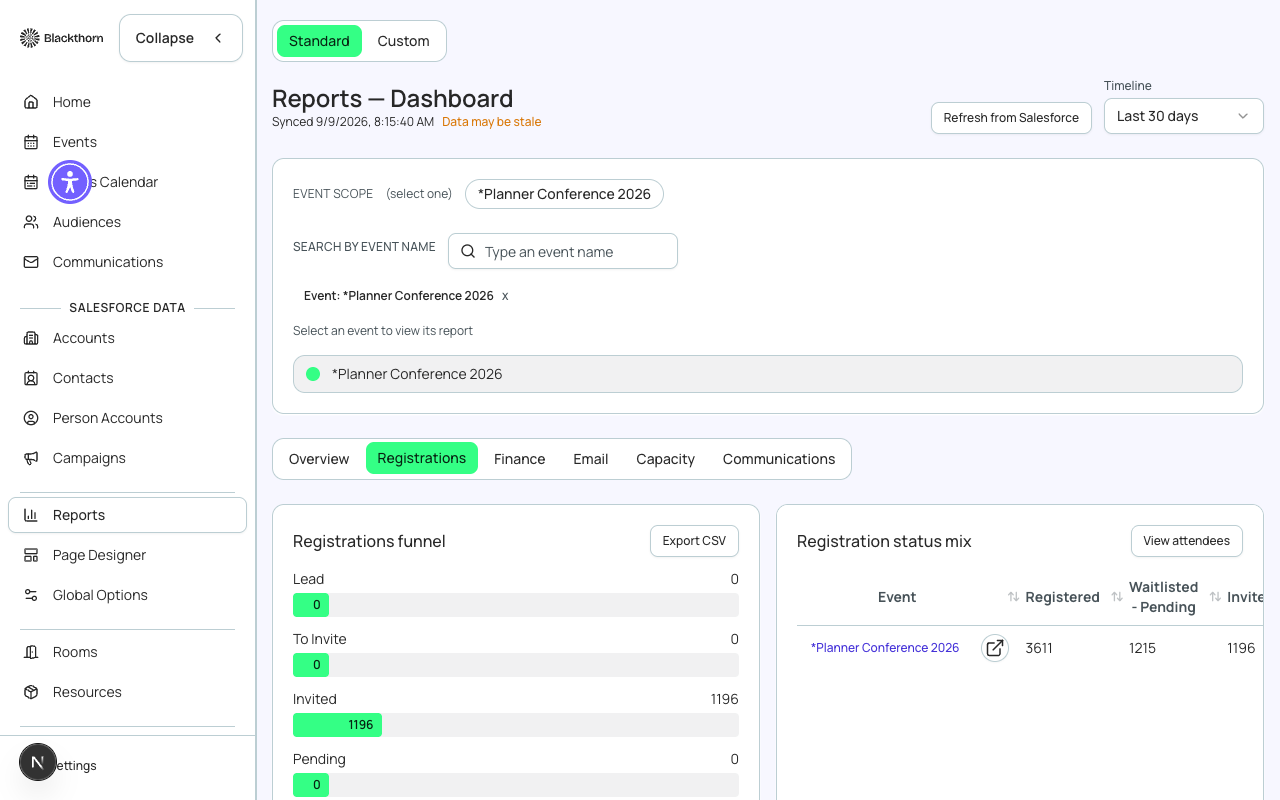
Funnel Stages
| Stage | Definition | Data source |
|---|---|---|
| Page Views | Total visits to the public event registration page | Forge analytics — counted via page load events |
| Form Started | Visitors who progressed past ticket selection and began filling in the registration form | Forge analytics — triggered when the first form field is interacted with |
| Form Submitted | Visitors who submitted the registration form successfully | conference360__Attendee__c records created |
| Payment Started (paid events) | Registrants who reached the payment step during checkout | bt_stripe__Sales_Document__c draft records |
| Payment Completed | Registrants who successfully completed payment | bt_stripe__Transaction__c with status Completed |
| Confirmed Registrations | Attendees with a Registered status on the event | conference360__Attendee__c.conference360__Status__c = 'Registered' |
Drop-off Analysis
Between each funnel stage, Forge shows the absolute drop-off count and the drop-off percentage. High drop-off at a specific stage points to an actionable problem:
| Drop-off point | Common causes | Recommended action |
|---|---|---|
| Page View → Form Started | Unappealing page design, confusing ticket options, price sticker shock | Review ticket names and descriptions; check page designer for clarity issues; consider adding a FAQ block |
| Form Started → Submitted | Form too long, confusing questions, required fields that registrants cannot answer | Audit form elements — remove unnecessary required fields; test the form yourself |
| Payment Started → Completed (paid events) | Credit card declined, form confusion, sticker shock at fee display, mobile UX issues | Review the checkout page on mobile; check if fees are surprising registrants; consider enabling Apple Pay / Google Pay via the gateway |
Pipeline View
The Pipeline view shows contacts who have been invited to the event but have not yet registered. Contacts appear in the pipeline when they are on the event's invitation list (added via the Audiences module or a CSV upload to the Invited list).
| Pipeline status | Definition |
|---|---|
| Invited | Contact has been sent an invitation email but has not visited the registration page |
| Page Viewed | Contact has visited the registration page (tracked via email link click + page load) |
| Form Started | Contact began the registration form |
| Registered | Contact completed registration — moves out of pipeline into confirmed attendees |
| Declined | Contact explicitly indicated they are not attending (via the invitation email decline link) |
Pipeline tracking requires invitation emails with tracked links
Pipeline attribution only works for contacts who arrive at the registration page via a tracked invitation email link. Direct URL visits or organic traffic are counted in the funnel page views but cannot be attributed to a specific contact in the pipeline.
Funnel Date Range
The funnel is shown for a configurable date range. By default it shows the full lifetime of the event (from the day the event was created through today). Narrow the range to see how a specific email campaign or promotional push affected conversion.
| Forge | SF Object | SF Field |
|---|---|---|
| Confirmed registrations | conference360__Attendee__c | conference360__Status__c = 'Registered' |
| Waitlisted registrations | conference360__Attendee__c | conference360__Status__c = 'Waitlisted' |
| Cancelled registrations | conference360__Attendee__c | conference360__Status__c = 'Cancelled' |
| Payment completed | bt_stripe__Transaction__c | Status = 'Completed' |
| Sales document | bt_stripe__Sales_Document__c | Links Attendee to Transaction |