Reporting and Finance
ROI and Finance Snapshot
The Finance Snapshot gives you a complete financial picture of your event — gross revenue, net revenue, refunds, fees, and projected ROI — all sourced from Salesforce transaction data. Access it from the event workspace under the Finance tab or Reporting tab.
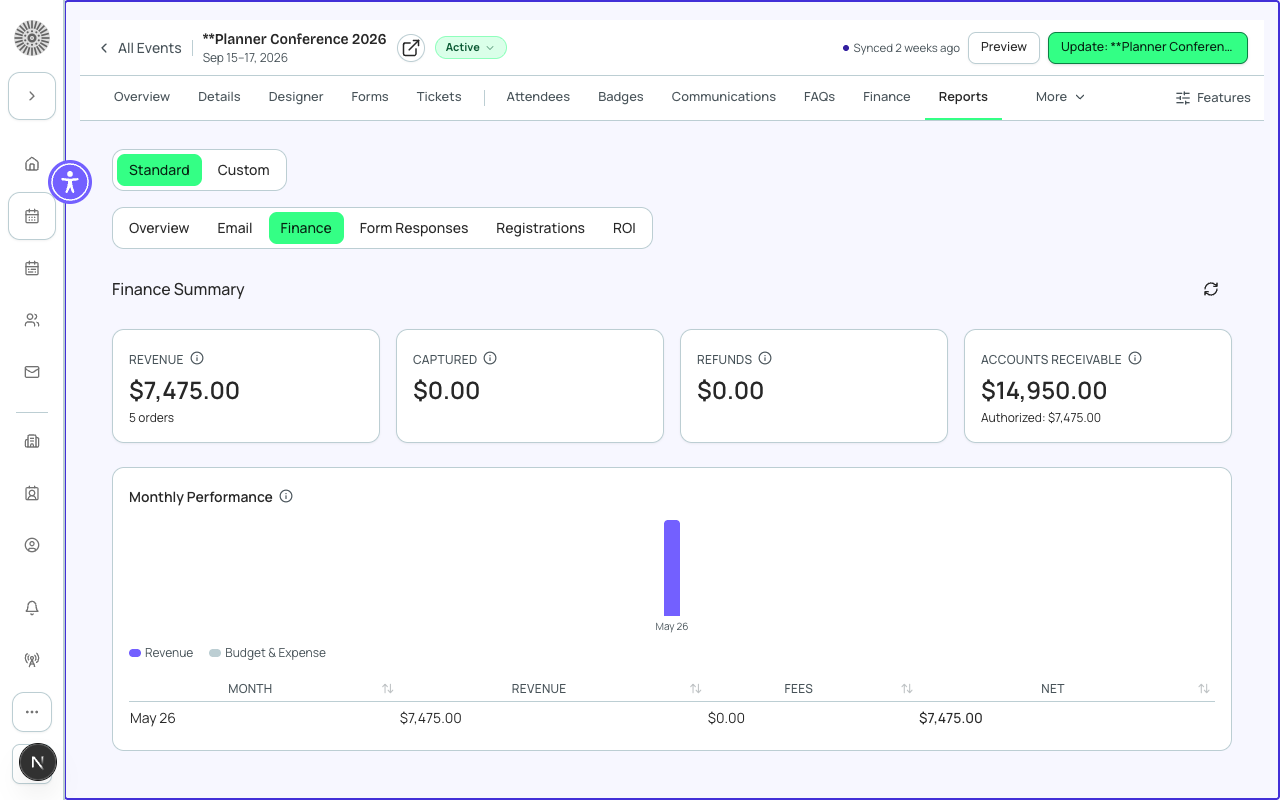
Revenue Summary
| Metric | Definition | SF source |
|---|---|---|
| Gross Revenue | Total amount collected from all completed ticket and product sales before any deductions | Sum of bt_stripe__Transaction__c amounts with status Completed |
| Refunds | Total amount refunded — subtracted from gross revenue | Sum of bt_stripe__Transaction__c amounts with status Refunded |
| Platform Fees | Forge platform service fees charged by your plan, if applicable | bt_stripe__Fee__c records of type Platform |
| Payment Processing Fees | Card processing fees charged by the payment gateway (e.g. Stripe's 2.9% + $0.30) | bt_stripe__Fee__c records of type Processing |
| Net Revenue | Gross Revenue minus Refunds minus all Fees | Calculated in Forge — not a stored Salesforce field |
| Outstanding Invoices | Total value of issued invoices not yet paid (invoice/group billing only) | bt_stripe__Sales_Document__c records with status Invoiced |
Revenue by Ticket Type
A breakdown of revenue by ticket type shows which items are driving the most income. This is useful for pricing strategy decisions on future events.
| Column | Definition |
|---|---|
| Ticket / Item | The ticket or product name |
| Quantity Sold | Number of this item sold (confirmed, not cancelled) |
| Price Per Unit | The list price of the item |
| Gross | Quantity × Price — total gross revenue from this item |
| Refunds | Amount refunded for this item type |
| Net | Gross minus Refunds for this item type |
ROI Calculator
The ROI panel lets you input event costs to calculate return on investment. Costs are entered manually (they are not pulled from Salesforce — cost data typically lives in procurement or accounting systems outside of Forge).
| Input | Description |
|---|---|
| Venue Cost | Total cost to rent the event venue |
| A/V and Production | Audio/visual equipment, streaming production, or staging costs |
| Catering | Food and beverage costs |
| Marketing Spend | Advertising, design, and promotion costs for this event |
| Staff and Labor | Event staff, contractors, and support costs |
| Other Costs | Any additional costs not captured in the above categories |
| Total Cost (auto-calculated) | Sum of all entered cost categories |
ROI is calculated as: (Net Revenue − Total Cost) ÷ Total Cost × 100. A positive ROI means the event generated more than it cost to run.
Cost data is not saved to Salesforce
ROI cost inputs are stored in Forge only and are not written back to Salesforce. For permanent cost tracking, record event costs in your Salesforce org using Opportunities, custom objects, or your accounting system integration.
Gateway Reconciliation
The Finance Snapshot includes a Gateway Reconciliation section that compares total transaction amounts in Forge against the amounts reported by your payment gateway. Discrepancies can indicate failed webhooks or refunds processed directly in the gateway portal that have not synced back to Salesforce.
Transaction data in Salesforce
Every completed transaction is stored as a bt_stripe__Transaction__c record in Salesforce. The Finance Snapshot aggregates these records. Refunds processed through Forge create a corresponding refund Transaction record. Never stores card or payment instrument data — only the transaction amount, status, and gateway token.