Reporting and Finance
Transactions and Refunds
The Transactions panel under the Finance tab shows every payment transaction associated with your event — charges, refunds, and voids — with full detail from Salesforce. You can issue refunds directly from Forge for any completed transaction.
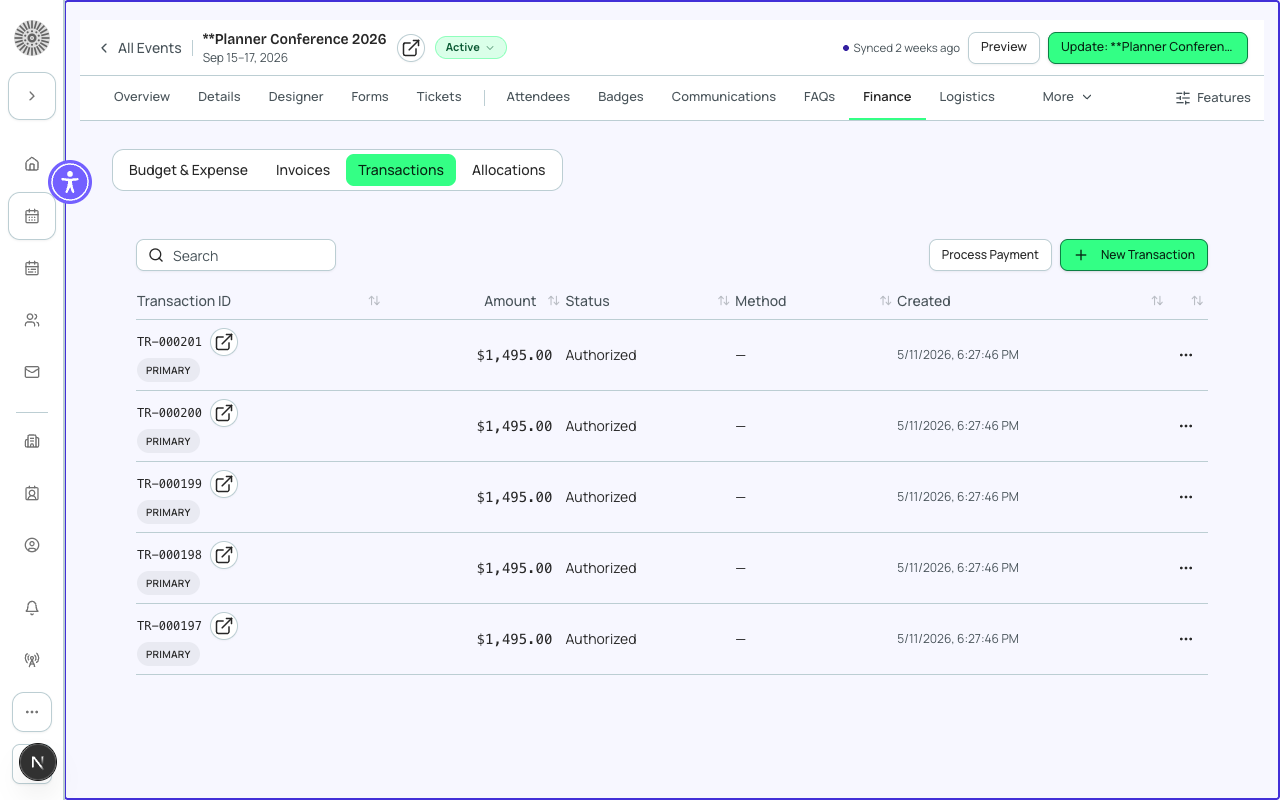
Transaction List
| Column | Definition | SF field |
|---|---|---|
| Transaction ID | Unique identifier for this transaction | bt_stripe__Transaction__c.Name |
| Date | Date and time the transaction was processed | bt_stripe__Transaction__c.CreatedDate |
| Attendee | The registrant's name linked from the associated Attendee record | conference360__Attendee__c — PII fetched just-in-time |
| Ticket / Items | Summary of what was purchased in this transaction | Derived from the linked bt_stripe__Sales_Document__c |
| Amount | The total amount charged in the event currency | bt_stripe__Transaction__c.bt_stripe__Amount__c |
| Fees | Platform and processing fees deducted from this transaction | bt_stripe__Fee__c linked to the Transaction |
| Net | Amount minus all fees | Calculated by Forge |
| Gateway | The payment gateway that processed this transaction | bt_stripe__Payment_Gateway__c.Name |
| Status | Completed, Refunded, Partially Refunded, Voided, or Failed | bt_stripe__Transaction__c.bt_stripe__Status__c |
Transaction Status Definitions
| Status | Meaning |
|---|---|
| Completed | Payment was successfully captured by the gateway and funds are on their way to your account |
| Refunded | The full amount of this transaction has been returned to the registrant's payment method |
| Partially Refunded | A portion of the transaction amount has been refunded; the remainder was retained |
| Voided | The transaction was cancelled before capture — no funds were collected or charged |
| Failed | The payment attempt was declined or errored — no funds were collected |
Issuing a Refund
- Find the transaction you want to refund in the Transactions list. Use the search field to find by attendee name or the amount filter to narrow results.
- Click the transaction row to open the detail drawer.
- Click Refund in the transaction detail panel.
- Choose Full Refund (the entire transaction amount) or Partial Refund (enter the amount to refund).
- Optionally enter a refund reason — this is stored on the Transaction record in Salesforce and is visible to your team but not to the registrant.
- Click Confirm Refund. Forge immediately calls the payment gateway API to process the refund.
- The transaction status updates to Refunded or Partially Refunded. The attendee's registration status is not automatically changed — update it separately if needed.
Refund timing
Refunds typically appear on the registrant's card statement within 5–10 business days, depending on their bank. Forge initiates the refund immediately, but the gateway's settlement timeline is outside of Forge's control. American Express refunds can take up to 14 business days.
Refund Restrictions
- Refunds can only be issued for transactions with a Completed status.
- The refund amount cannot exceed the original transaction amount.
- Refunds cannot be processed for transactions older than 180 days via Forge — for older refunds, issue directly in the gateway portal.
- Free (zero-amount) transactions cannot be refunded — no charge was made.
- Refunds processed directly in the gateway portal (outside of Forge) create a refund Transaction record in Salesforce via webhook, but the Attendee status in Forge will not automatically update.
Refund records in Salesforce
Every refund creates a new bt_stripe__Transaction__c record in Salesforce with a status of Refunded and a negative amount, linked to the original Transaction via a lookup. This preserves the full audit trail in Salesforce.
Recurring Payments
For events that collect recurring payments (e.g. installment plans or recurring donation tickets), each individual charge appears as a separate Transaction record. Recurring schedules are managed via bt_stripe__Payment_Schedule__c in Salesforce and executed by the HighVolumeTransactionBatchScheduler Apex batch — not by Stripe subscriptions.
Recurring payment engine
Forge does not use Stripe Subscriptions or bt_stripe__Subscription2__c for any recurring charges. All recurrence logic runs on the Salesforce bt_stripe__Payment_Schedule__c infrastructure. Do not attempt to configure Stripe Subscriptions through the gateway portal — it will not integrate with Forge's transaction records.