Beta & Experimental Features
Checkout Flow (Beta)
In DevelopmentManage on the Beta Features pageThe Checkout Flow visualizer lets event planners preview and inspect the full attendee registration experience for their event — from landing page through payment confirmation — without leaving Forge.
Beta feature
Checkout Flow is a beta feature. Enable it for your org on the /beta page. The visualizer renders a live preview of your current event configuration; it does not create test registrations or charge payment methods.
What it does
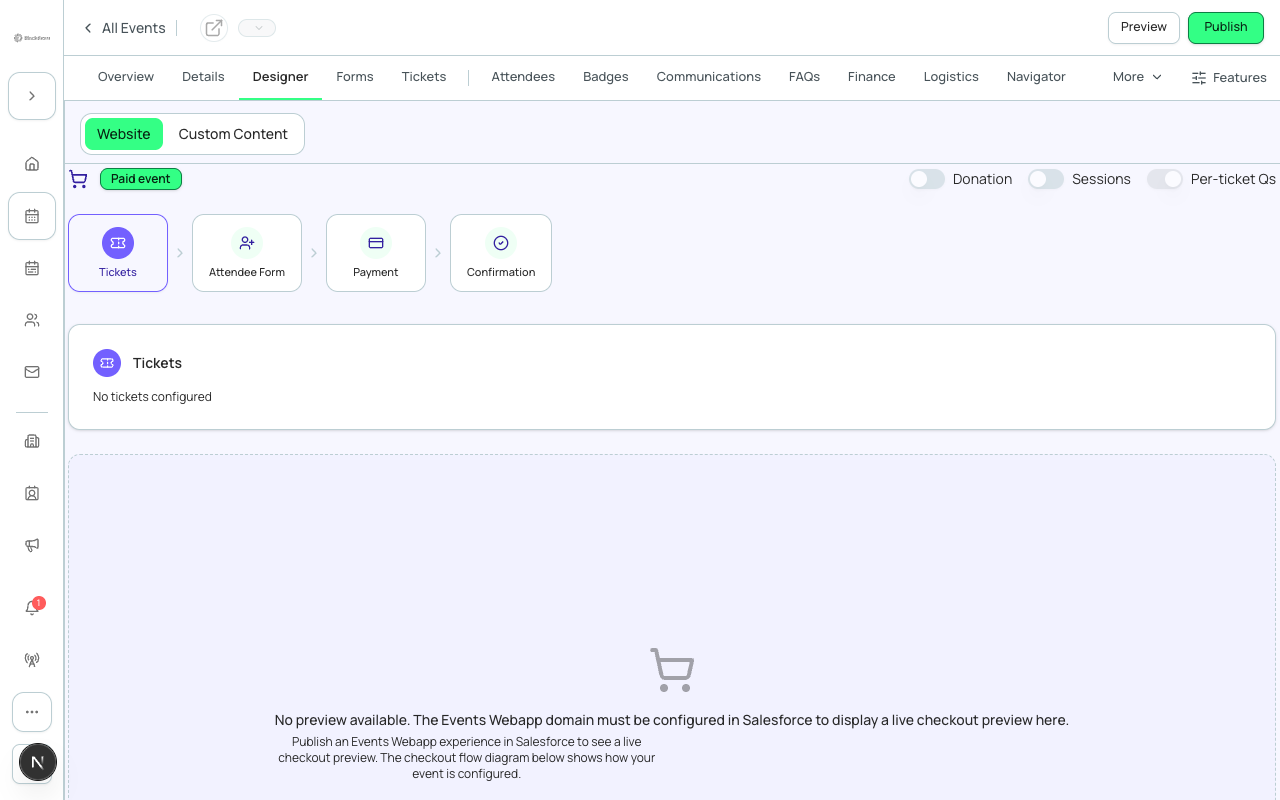
The Checkout Flow visualizer renders an interactive, read-only preview of the attendee registration journey based on your live event settings. It shows how form questions, ticket options, discount codes, fees, and payment steps will appear to a real attendee.
- A step-by-step swim-lane view of the checkout journey — Tickets, Attendee, and (only when your event has them) Per-Ticket Questions, Donation, and Sessions — followed by Payment and Confirmation
- Toggle switches to show or hide the Donation, Sessions, and Per-Ticket Questions lanes
- A Tickets lane where you can select a specific ticket to preview the path an attendee choosing it would follow
- A Free Event / Paid Event badge reflecting your event's actual pricing setup
- A live embedded preview of the real checkout page at the bottom, with an Open Checkout link to open it directly
How to enable
- Go to /beta and toggle Checkout Flow on.
- Open your event, then go to its Checkout Preview page — this page is not yet linked from the Designer tab bar, so navigate directly to /events/{eventId}/manage/designer/checkout-preview.
- Use the swim-lane navigator to step through Tickets, Attendee, and the other lanes your event has configured.
- Use the toggles at the top to show or hide the Donation, Sessions, and Per-Ticket Questions lanes.
- Select a specific ticket in the Tickets lane to preview the path an attendee choosing it would follow.
- Scroll down to the live embedded preview, or use Open Checkout to open the real checkout page in a new tab.
Current limitations
- The visualizer is read-only. You cannot submit a test registration or trigger a test payment from within it.
- Only one lane's detail panel is shown at a time — there's no side-by-side comparison view.
- This page isn't yet linked from the Designer tab bar; reach it directly by URL.
- The live preview embed depends on your event's theme/preview configuration; if that isn't set up, it shows a "preview unavailable" placeholder instead of the real checkout page.
Salesforce note
The Checkout Flow visualizer reads live ticket, form, session, and payment-gateway data for your event through Forge's existing Salesforce-backed APIs — the same data your registration form and checkout page read from. It never creates or modifies Salesforce records.