Beta & Experimental Features
How Beta Works
Forge ships experimental features under a beta program that lets your organization try new capabilities before they reach general availability. Beta features are fully functional but may change in behavior, API shape, or design based on feedback.
Beta features are opt-in
No beta feature is ever enabled by default. Your live event operations are never affected unless you explicitly turn a feature on.
The beta program
Beta features are controlled at the tenant (org) level through the Beta Features page at /beta. When a feature is enabled there, it becomes available across your entire Forge installation — all users in your org can see and use it. There is no per-user granularity within the same org.
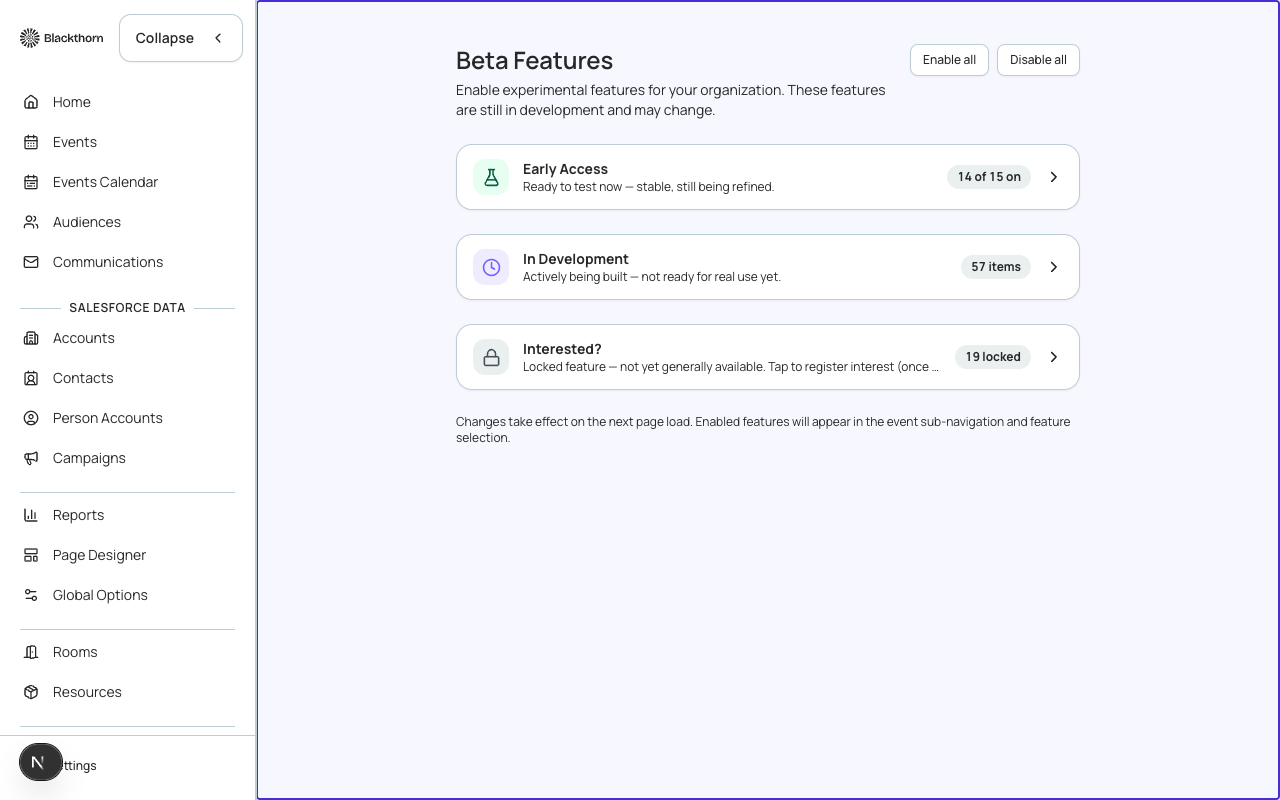
Feature statuses in the registry
Every feature in Forge has one of three statuses that control when it appears in your workspace:
| Status | What it means | Opt-in required? |
|---|---|---|
| live | Always available to all tenants. No action needed. | No |
| beta | Ready for real-world use but still evolving. Enabled per tenant via /beta. | Yes — toggle on /beta |
| hidden | Not yet available for general use. May be visible on /beta as a preview toggle for early access. | N/A — not yet usable |
Enabling a beta feature
- Navigate to /beta from the Forge sidebar (Admin section) or type the URL directly.
- Find the feature you want to enable in the Beta Features list.
- Toggle the feature on. Changes take effect immediately for your entire org — no deploy needed.
- If a feature requires additional Salesforce metadata (e.g. a new managed package), a callout on the /beta page will tell you what to install first.
- To turn a feature off, return to /beta and toggle it off. Your data is preserved.
Giving feedback
Every beta feature page inside Forge includes a feedback link. Use it to report unexpected behavior, suggest improvements, or tell us your workflow. Beta graduation decisions are driven by this feedback. You can also reach the team through your Customer Success contact or the Forge in-app chat.
Graduation to general availability
When a beta feature has been validated across enough tenants and passes quality, security, and accessibility reviews, it graduates to status live. At that point the toggle disappears from /beta and the feature becomes available to all tenants automatically. Your configuration and data are preserved through the transition.
Breaking changes during beta
Because beta features are still evolving, the underlying Salesforce field names, API shapes, or UI layouts may change before graduation. Forge will communicate breaking changes through the in-app changelog and your Customer Success channel. Avoid building critical automations on top of beta features without checking the latest status.
Beta Features
These features are available today via the Beta opt-in page. They are stable enough to use but may change before general availability.
Badges
BetaPrint name badges and check-in passes for attendees.
Enable at /beta
Tables & Seating
BetaAssign attendees to tables with seating charts and meal preferences.
Enable at /beta
Donations
BetaAccept donations alongside ticket orders for this event.
Enable at /beta
Auctions
BetaRun charity auctions with items, bidders, packages, and raffles.
Enable at /beta
Communications (Global)
BetaSend and manage event emails and notifications.
Enable at /beta
Fees
BetaAdd processing fees, service charges, or surcharges to ticket orders.
Enable at /beta
Invoices
BetaGenerate and manage invoices for event orders and sponsorships.
Enable at /beta
Navigator
BetaProvide attendees with an interactive event guide and wayfinding.
Enable at /beta
Translations
BetaTranslate event content and registration forms into multiple languages.
Enable at /beta
Visibility
BetaControl who can view and register for your event.
Enable at /beta
Data Dictionary
BetaCreate custom labels and content tokens to reuse across your event pages, forms, and emails.
Enable at /beta
Per-Path Registration Automations
BetaConfigure a different registration confirmation email per ticket type / registration path.
Enable at /beta
Custom Objects in Sidebar
BetaAdd custom Salesforce objects as sidebar navigation links.
Enable at /beta
Accounts & Contacts
BetaShow Accounts and Contacts in the main sidebar navigation.
Enable at /beta
VIP Seating Adjacency
BetaTrack cross-event seating pairings for VIP donor stewardship.
Enable at /beta
ROI Dashboard
BetaSee net ROI — revenue minus actual spend — with budget variance by category.
Enable at /beta
Public Auction Pages
BetaEnable the Forge-native public auction catalog, item detail, registration, raffle, and package pages for bidders.
Enable at /beta
Mobile Spotter
BetaEnable the mobile spotter surface for staff to record floor bids and manage the live bid feed during an in-room auction.
Enable at /beta
P2P Team Fundraiser Pages
BetaLet donors create peer-to-peer fundraising teams from a public page and share a team link.
Enable at /beta
Roadmap
BetaSee Blackthorn's product roadmap for upcoming Forge features.
Enable at /beta
Volunteer Check-in
BetaLet volunteers check attendees in at the door using the standalone check-in app.
Enable at /beta
Sponsorship Tiers
BetaDefine sponsorship packages with price, included tickets, and benefits for this event.
Enable at /beta
Public Sponsorship Purchase Page
BetaLet prospective sponsors purchase a sponsorship package from a public page and receive an automatic ticket allotment.
Enable at /beta
Block Ticketing
BetaSell a ticket as a block (e.g. a table for 8) — one purchase seats a coordinator plus placeholder guests who can be invited to fill the rest later.
Enable at /beta
Coming Soon
Features currently in development. These are not yet available for opt-in.
- Checkout Flow— Visualize and customize the attendee checkout experience.
- Logistics— Coordinate travel, shipping, and on-site logistics.
- Unified Portal— Enable the self-service unified portal — attendee, speaker, and sponsor sections, each visible only to a Contact who holds that role. Old /attendee-portal links keep working via a redirect.
- Active Emails Dashboard— Cross-event view of scheduled, active, and recently sent email sends.
- Recurring Events— Create repeating event series on a daily, weekly, or monthly schedule.
- Audience Segments— Source an attendee audience segment for this event from a report, campaign, list view, or contact query.
- SMS— Send SMS text messages to attendees directly from Forge.
- Push Notifications— Send in-app push notifications to attendees on mobile devices.
- Custom Profiles— Create custom permission profiles with granular nav access controls.
- Housing Providers— Manage hotel provider integrations (Passkey, MeetingMax).
- Payment Gateways— Configure payment gateway connections for Stripe, Authorize.Net, and other providers.
- Campaigns— Show Campaigns in the main sidebar navigation with full create/edit/delete and member management.
- Audiences— Show Audiences in the main sidebar navigation.
- Template Gallery— Browse and import pre-built email templates from the gallery.
- Salesforce Template Import— Import existing Salesforce email templates into the Forge template library.
- Resource Management— Manage rooms, resources, and session assignments.
- Kiosk Check-In— Let attendees check themselves in (and optionally self-register) at an unattended device.
- Exhibit Spaces— Manage floor plans and exhibitor booth assignments.
- Giving Data Models— Detect and manage NPSP, Nonprofit Cloud, and Education Cloud giving data models.
- Native Webinar OAuth— Connect Zoom, GoTo, or Webex accounts directly in Forge (beta preview).
- Webinar Minutes → Legacy Video Field— Write Zoom-derived attendance minutes into the existing Minutes Watched of Video field. This field is shared with on-demand video playback minutes — on by default.
- Event Tasks— Assign tasks to staff with due dates, priorities, and status tracking.
- Milestones & Deadlines— Track milestones, deadlines, and progress with automatic reminder alerts.
- Budget Insights & Alerts— Get spend-limit alerts and forecast variance on top of your event budget.
- My Tasks— See every task assigned to you across all your events in one list.
- Staff Workload— Track weekly capacity vs. open task hours for your event staff across every event.
- Org Events Calendar— See every event in your org on a month, week, day, or agenda calendar.
- Vendor & PO Tracking— Track purchase orders per vendor and reconcile them against real spend.
- Vendor Portal— Manage a vendor directory with contacts, communications, documents, quotes, contracts, and budgets for each event vendor.
- Budget Approval Workflow— Route budget category changes through an explicit approve/reject workflow.
- Attendee Materials & Certificates— Let attendees download session materials, event resources, and attendance-gated certificates from the attendee portal.
- Contract & Deadline Register— Track contracts, deliverables, and deadlines with automatic reminder alerts.
- Re-engage— Re-engage past contacts through conversational outreach on the channels they already use, with in-thread re-registration.
- Slack Owner Notifications— DM the Salesforce Contact Owner in Slack when their owned attendee registers or checks in.
- MS Teams Meetings Integration— Create and manage Microsoft Teams meetings directly from your events and sessions.
- MS Teams Bot— A Microsoft Teams bot for event notifications and workflows.
- Slack App— A dedicated Blackthorn Slack app for event notifications and workflows.
- Text-to-Give— Text a give-link to attendees automatically when they check in to an event.
- New Checkout Experience— Switch this tenant's event registrations to the new checkout experience. Off keeps your current checkout unchanged.
- Authoritative Donation Pricing— Route give-page donation pricing through the Forge pricing engine instead of the legacy amount-validation path. Off keeps current behavior unchanged.
- Authoritative Auction Pricing— Route auction catalog, item, raffle, and package pricing through the Forge pricing engine instead of direct field reads. Off keeps current behavior unchanged.
- Authoritative Checkout Pricing— Route checkout-embed event pricing through the Forge pricing engine instead of the external pricing proxy. Off keeps current behavior unchanged.
- Page Designer— Enable the Forge-native Page Designer storage substrate and its public render-contract routes.
- React Page Designer (Event Landing Pages)— Route this event's public landing page through the Forge-native React Page Designer instead of the existing events-webapp Angular landing page.
- React Page Designer (Donation Pages)— Route the give page through a tenant's published Forge-native Page Designer donation page instead of the existing hand-built give page.
- Asset Library— Enable the unified image index over Salesforce Files, shared across upload surfaces.
- Public Donation Pages— Enable the Forge-native public give-page donation surface and its config route for this tenant.
- Donation Payment Methods— Offer ACH bank debit, Apple Pay, and Google Pay alongside card on the public give page (Stripe-connected tenants only).
- Beacon— Enable the Beacon AI Events Copilot panel for this tenant.
- Checkout: Stripe Checkout (Redirect)— Accept payment via a hosted Stripe Checkout page instead of an embedded card field, for events configured with a Stripe Checkout gateway.
- Abstracts— Run a call for proposals with submitter and reviewer portals, a scoring rubric, and accept-to-agenda promotion.
- Custom Report Builder— Build custom reports across events, registrations, payments, donations, and more — with your own filters, groupings, and charts.
- Forge-Managed Users (No Salesforce Account)— Invite people to use Forge with a Forge-managed username and password, without a Salesforce user account. Their writes still run through your org's existing Salesforce connection — Forge tracks who made each change separately. These users see all Salesforce data synced into Forge, not sharing-restricted subsets.
- Event Requests (Intake Forms)— Let people outside the planner shell request a new event via a public, portal, or Forge-login-gated form. Submissions queue for a planner to review and approve before any Salesforce Event is created.
- Registration Paths— Offer different registration experiences — pricing, forms, approval and capacity — to different audiences on the same event.
- Registration Path Selector— Let registrants choose which registration path applies to them before they start registering.
- Register on Behalf Of— Register an attendee yourself — tickets, sessions, group and payment — in one guided flow.
- Group Registration Forms— Let a group's primary registrant complete prefilled registration details and RSVP for their whole invited group in one flow, instead of each guest registering separately.
- Bulk Contact Tagging— Add tags to the Contacts behind selected attendees in one bulk action.
- Group Invoice Statement— View a read-only consolidated statement across the invoices behind a group of selected attendees.
- Attendee/Contact Opt-In Sync— Keep each Attendee's email opt-in status in sync with the linked Contact's Salesforce email opt-out setting.
- Related Contact Notifications— Notify a related Contact automatically when the person they're linked to registers for this event.
- Google Wallet Passes— Let attendees add their check-in badge to Google Wallet, alongside the existing Apple Wallet option.
- Localized Attendee Emails— Send attendee-facing transactional emails in the recipient's own registered language instead of always in English.
- Form Heading Translations— Translate a form's own heading, description, and submitted-confirmation message, not just its individual questions.
- Barcode Management— Create, move, void, and allocate Forge-managed barcode records for an event (check-in, seating, and session scanning).
- Secondary Ticket Codes— Attach a pool of secondary codes (parking, locker, merch, etc.) to a ticket and issue one automatically on registration.
- Visibility Rule Preview— Preview which Contacts an Advanced Visibility rule would currently match, evaluated by a Forge-native reimplementation of the rule engine (not the packaged Salesforce evaluator).
- Appointment Scheduling— Book 1:1 appointments with hosts using configurable availability, buffers, and booking rules.
- Public Appointment Booking Pages— Expose the public, unauthenticated /book/* booking pages for this tenant, independently of admin-only Appointment Scheduling.
- Calendar Sync— Let a host connect their own Google or Microsoft calendar so Forge can check busy time before offering appointment slots.
- Attendee Meetups— Let attendees at this event request and confirm 1:1 meetups with each other.
- Attendee Meetups (Portal)— Show the attendee directory and meetup requests in the attendee portal for this event.